
Decision making is anticipation of conditions occurring while execution of the program and specifying actions taken according to the conditions.
Decision structures evaluate multiple expressions which produce TRUE or FALSE as outcome. You need to determine which action to take and which statements to execute if outcome is TRUE or FALSE otherwise.
Following is the general form of a typical decision making structure found in most of the programming languages −
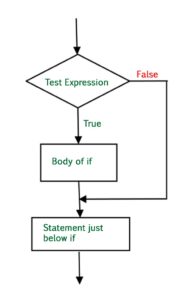
Python programming language assumes any non-zero and non-null values as TRUE, and if it is either zero or null, then it is assumed as FALSE value.
Python programming language provides following types of decision making statements. Click the following links to check their detail.
| Sr.No. | Statement & Description |
|---|---|
| 1 | if statements An if statement consists of a boolean expression followed by one or more statements. |
| 2 | if...else statements An if statement can be followed by an optional else statement, which executes when the boolean expression is FALSE. |
| 3 | nested if statements You can use one if or else if statement inside another if or else if statement(s). |
Let us go through each decision making briefly −
Python IF Statement
It is similar to that of other languages. The if statement contains a logical expression using which data is compared and a decision is made based on the result of the comparison.
Syntax
if expression:
   statement(s)
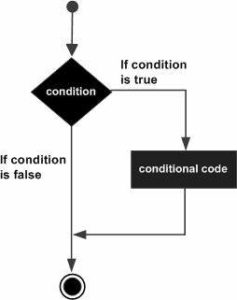
If the Boolean expression evaluates to TRUE, then the block of statement(s) inside the if statement is executed. If Boolean expression evaluates to FALSE, then the first set of code after the end of the if statement(s) is executed.
Flow Diagram
Example
#!/usr/bin/python
var1 = 100
if var1:
   print "1 - Got a true expression value"
   print var1
var2 = 0
if var2:
   print "2 - Got a true expression value"
   print var2
print "Good bye!"
When the above code is executed, it produces the following result −
1 - Got a true expression value
100
Good bye!
Python IF...ELIF...ELSE Statements
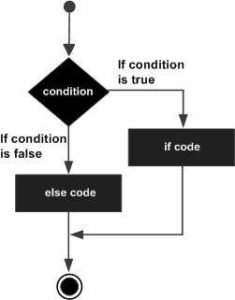
An else statement can be combined with an if statement. An else statement contains the block of code that executes if the conditional expression in the if statement resolves to 0 or a FALSE value.
The else statement is an optional statement and there could be at most only one else statement following if.
Syntax
The syntax of the if...else statement is −
if expression:
   statement(s)
else:
   statement(s)
Flow Diagram
Example
#!/usr/bin/python
var1 = 100
if var1:
   print "1 - Got a true expression value"
   print var1
else:
   print "1 - Got a false expression value"
   print var1
var2 = 0
if var2:
   print "2 - Got a true expression value"
   print var2
else:
   print "2 - Got a false expression value"
   print var2
print "Good bye!"
When the above code is executed, it produces the following result −
1 - Got a true expression value
100
2 - Got a false expression value
0
Good bye!
The elif Statement
The elif statement allows you to check multiple expressions for TRUE and execute a block of code as soon as one of the conditions evaluates to TRUE.
Similar to the else, the elif statement is optional. However, unlike else, for which there can be at most one statement, there can be an arbitrary number of elif statements following an if.
syntax
if expression1:
   statement(s)
elif expression2:
   statement(s)
elif expression3:
   statement(s)
else:
   statement(s)
Core Python does not provide switch or case statements as in other languages, but we can use if..elif...statements to simulate switch case as follows −
Example
#!/usr/bin/python
var = 100
if var == 200:
   print "1 - Got a true expression value"
   print var
elif var == 150:
   print "2 - Got a true expression value"
   print var
elif var == 100:
   print "3 - Got a true expression value"
   print var
else:
   print "4 - Got a false expression value"
   print var
print "Good bye!"
When the above code is executed, it produces the following result −
3 - Got a true expression value
100
Good bye!
Python nested IF statements
There may be a situation when you want to check for another condition after a condition resolves to true. In such a situation, you can use the nested if construct.
In a nested if construct, you can have an if...elif...else construct inside another if...elif...else construct.
Syntax
The syntax of the nested if...elif...else construct may be −
if expression1:
   statement(s)
   if expression2:
      statement(s)
   elif expression3:
      statement(s)
   elif expression4:
      statement(s)
   else:
      statement(s)
else:
   statement(s)
Example
#!/usr/bin/python
var = 100
if var < 200:
   print "Expression value is less than 200"
   if var == 150:
      print "Which is 150"
   elif var == 100:
      print "Which is 100"
   elif var == 50:
      print "Which is 50"
   elif var < 50:
      print "Expression value is less than 50"
else:
   print "Could not find true expression"
print "Good bye!"
When the above code is executed, it produces following result −
Expression value is less than 200
Which is 100
Good bye!
Single Statement Suites
If the suite of an if clause consists only of a single line, it may go on the same line as the header statement.
Here is an example of a one-line if clause −
#!/usr/bin/python
var = 100
if ( var == 100 ) : print "Value of expression is 100"
print "Good bye!"
When the above code is executed, it produces the following result −
Value of expression is 100
Good bye!
Comments
Post a Comment